Audi A3 (8P) – Show hidden menu Climatronic (Coding)
Purpose: Allows you to display the hidden menu of the Climatronic (Hidden Menu).
Display instantaneous digital speed? It’s possible! No need to use your VCDS VAG-COM cable for this tutorial.
What is it for?
In the hidden Audi Climatronic menu, you can easily access secret diagnostic readings like battery voltage, car speed, engine RPM, sensor reading, system DTC codes and much more.
Audi Climatronic hidden menu procedure
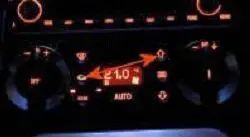
To display certain car operating parameters on the air conditioning screen:
- Press the air recycling button and the ventilation up button simultaneously.
- The display shows “1C” (channel 1 is default).
- Use the temperature change lever to select the desired function. “+” to access the upper channel and “-” to access the lower channel.
- For example, for Real-time Engine Oil Temperature, you need to display channel 51 (51C on the screen).
- Validate the function by pressing the air recycling button.
- The information for the selected channel is then displayed on the air conditioning screen.
List of hidden channels in menus
| 1 | System error |
| 2 | Virtual sensor value |
| 3 | Console interior sensor value |
| 4 | Outdoor temperature value – water tank sensor |
| 5 | Outside temperature value – bumper sensor |
| 6 | Lower blow sensor value |
| 7 | Front blowing sensor value |
| 8 | Display check |
| 9 | Digital value potentiometer return temperature valve |
| 10 | Digital temperature valve setting |
| 11 | Digital value of the air conditioning valve return potentiometer |
| 12 | Digital instruction air conditioning valve |
| 13 | Digital value of the foot valve/defrosting return potentiometer |
| 14 | Digital foot valve/defrosting instruction |
| 15 | Digital value of the blowing air flap return potentiometer |
| 16 | Digital instruction for blowing air valve |
| 17 | Speed in km/h |
| 18 | Ventilation voltage value (Volts) |
| 19 | Ventilation voltage setpoint (Volts) |
| 20 | Compressor voltage value (Volts) |
| 21 | Number of very low voltage (non-volatile) events |
| 22 | High pressure switch status |
| 23 | Number of high pressure (volatile) events |
| 24 | Number of high pressure events (non-volatile) |
| 25 | A/D Value Kick-Down Switch |
| 26 | A/D value hot indicator light |
| 27 | Engine speed |
| 28 | Compressor speed |
| 29 | Coding |
| 30 | Software version |
| 31 | Software index |
| 32 | Potentiometer error counter temperature valve |
| 33 | Air conditioning valve potentiometer error counter |
| 34 | Potentiometer error counter foot valve/defrosting |
| 35 | Error counter potentiometer air blowing valve |
| 36 | Cold stop temperature valve |
| 37 | Hot stop temperature valve |
| 38 | Closed air conditioning flap stop |
| 39 | Air conditioning flap stop open |
| 40 | Defrost stop foot valve/defrosting |
| 41 | Foot stop foot valve/defrosting |
| 42 | Open air blowing flap stop |
| 43 | Closed air blowing flap stop |
| 44 | Driving cycle counter |
| 45 | Calculated indoor temperature (Ninc) |
| 46 | Filtered outdoor temperature (°C) |
| 47 | Unfiltered outdoor temperature (°C) |
| 48 | ECOR |
| 49 | Coolant temperature |
| 50 | Downtime in minutes |
| 51 | Engine temperature in °C |
| 52 | Compressor shutdown conditions |
| 53 | Display active electrical outputs: compressor, ambient air valve, water valve |
| 54 | Regulation indication number |
| 55 | Outside temperature in °C |
| 56 | Virtual indoor sensor °C |
| 57 | Interior console sensor °C |
| 58 | Water tank temperature °C |
| 59 | Bumper temperature °C |
| 60 | Lower blowing sensor temperature |
| 61 | Front blowing sensor temperature |
| 62 | Solar intensity W/m-1 |
| 63 | Filtered solar intensity W/m-1 |
| 64 | Delta increase ventilation |
| 65 | Delta transition air conditioning flaps |
| 66 | Cadence time /1.6 sec |
| 67 | Cold start correction |
| 68 | Maximum setpoint value of P and I components |
| 69 | Blowing sensor value feet (cnts) |
| 70 | Blowing feet sensor instruction (cnts) |
| 71 | Difference (Epsilon) |
| 72 | Part (+ heat / – cool) |